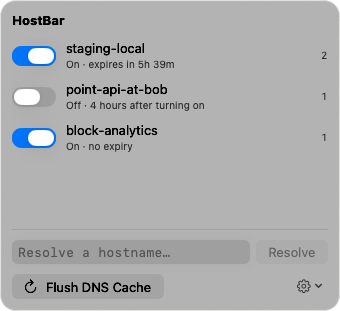
HostBar
Switch hosts files between dev, staging, and prod on Mac
The usual setup: the same hostnames point at your laptop for dev, at staging servers for testing, and at nothing at all for prod, where real DNS should answer. macOS has one /etc/hosts and no notion of profiles, so switching means rewriting that file. Here are the three common ways, and the failure each one tends to produce.
Option 1: commented blocks
Keep every setup in the file and comment out the ones you are not using:
# --- dev ---
127.0.0.1 api.example.com app.example.com
::1       api.example.com app.example.com
# --- staging ---
#10.20.0.15 api.example.com
#10.20.0.16 app.example.com
Switching is sudo nano /etc/hosts, a few # characters moved, and a save. "Prod" means every block commented out.
How it goes wrong:
- Two blocks uncommented at once. For the same hostname the first matching line wins, so whichever block sits higher in the file quietly takes over.
- Half a block switched. The 127.0.0.1 line is commented and the ::1 line is not, so IPv6-first tools still go to your laptop.
- You forget. Dev stays on for a week and a "prod" bug report turns out to be your own machine.
Option 2: separate files copied into place
Keep hosts.dev, hosts.staging, and hosts.prod somewhere of your own, each a complete hosts file, and copy one over the real one:
sudo cp ~/hosts/hosts.staging /etc/hostsGas Mask and similar apps do this with a menu instead of a command.
How it goes wrong:
- It replaces the whole file. A line you or another tool added to /etc/hosts since the last switch is gone. Every copy has to carry the localhost, broadcasthost, and ::1 localhost lines too; lose them and localhost breaks.
- The copies drift apart. A new shared entry has to be added to three files, and sooner or later one misses it.
- Use cp, not mv. Copying over an existing file keeps its root:wheel owner and -rw-r--r-- mode. sudo mv swaps in your file with your user as owner and whatever mode it had. Check with ls -l /etc/hosts.
Option 3: a script and a marked block
Leave the rest of the file alone and rewrite only a section between two marker lines. A small script with sed can do it. The empty '' after -i is required by the BSD sed that ships with macOS:
#!/bin/sh
# usage: hosts-env dev|staging|prod
set -e
begin='# >>> env'
end='# <<< env'
# delete the old block
sudo sed -i '' "/^$begin/,/^$end/d" /etc/hosts
# append the new one (prod has no file: real DNS answers)
if [ "$1" != prod ]; then
  { echo "$begin $1"; cat "$HOME/hosts/$1"; echo "$end"; } | sudo tee -a /etc/hosts >/dev/null
fi
sudo dscacheutil -flushcache; sudo killall -HUP mDNSResponder
This is the most reliable of the three, and it still leaves you the upkeep:
- A typo in a marker, or someone hand-editing between the markers, and the delete step removes the wrong lines or nothing. Keep a backup first: sudo cp /etc/hosts /etc/hosts.bak.
- Every switch prompts for your password, so people stop switching and leave staging on.
- Nothing tells you afterwards which setup is live, except reading the file.
Check which setup is live
Whatever you use, check before you trust a result. The first command lists every line that is not a comment; the second shows what the system resolver answers:
grep -v '^[[:space:]]*#' /etc/hosts | grep -v '^[[:space:]]*$'
dscacheutil -q host -a name api.example.com
Do not check with dig or nslookup; they skip the hosts file. Then quit and reopen the browser, which keeps connections and its own cache: an open staging tab can keep talking to the old address for minutes after the switch.
A note on prod
Pointing prod hostnames at a specific server is the riskiest line in the file: you think you are testing production and you are testing one box, or the reverse. Give that kind of line a comment with the date and reason, and take it out the same day.
Profiles instead of files
HostBar's profiles are this setup with the upkeep done for you. "dev" and "staging" are each a named set of lines; the switch in the menu bar writes them into one marked block in /etc/hosts and removes exactly those lines when you turn it off, with every other line in the file left alone. Each profile switches itself off after eight hours unless you choose otherwise, the menu bar shows when overrides are on, and if something else edits the block HostBar tells you. Profiles are plain JSON, so a team can keep them in the repo.